Turn a wall of agreement text into a clean, professional contract in one click
Paste your service agreement from Word or a PDF and InspectorData notices it landed as one giant block of text. One click adds headings, bullets, numbered clauses, and an initials box. Your wording never changes.
What is Agreement Clean-Up?
Agreement Clean-Up is a one-click tool in the InspectorData Agreement Center that turns a home inspection service agreement pasted as one block of text into a formatted contract with a title, section headings, paragraphs, bullet lists and an initials box. It never changes a word: the visible text is compared before and after, and the clean-up is refused if a single character differs.
- Wording: never changed, checked character by character before and after.
- AI: none. It formats the structure already in your text; it does not rewrite your contract.
- Auto-fill fields: {client_name}, {property_address}, {total_price} and the rest are kept exactly.
- Control: it asks first, shows Compare and Undo, and saves only when you click Save Changes.
- Where: pasting into the editor, opening an agreement, Create New Agreement, and a toolbar button.
- Existing agreements: every plain-text agreement already on InspectorData has been cleaned up.
A Wall of Text Is a Contract Nobody Reads
Your agreement came out of Word or a PDF as one dense paragraph, and your clients are the ones asked to sign it.
Clients Skim Instead of Read
A single unbroken block of legal text gets skimmed, not read, and clients sign without ever finding the fee or the terms they agreed to.
Looks Unprofessional
The first document a new client sees from you is a wall of text pasted straight out of Word. It doesn't match the rest of a polished inspection business.
Hard to Find the Fee or Terms
When every clause runs into the next with no headings or breaks, even you have to hunt for a specific section when a client asks about it.
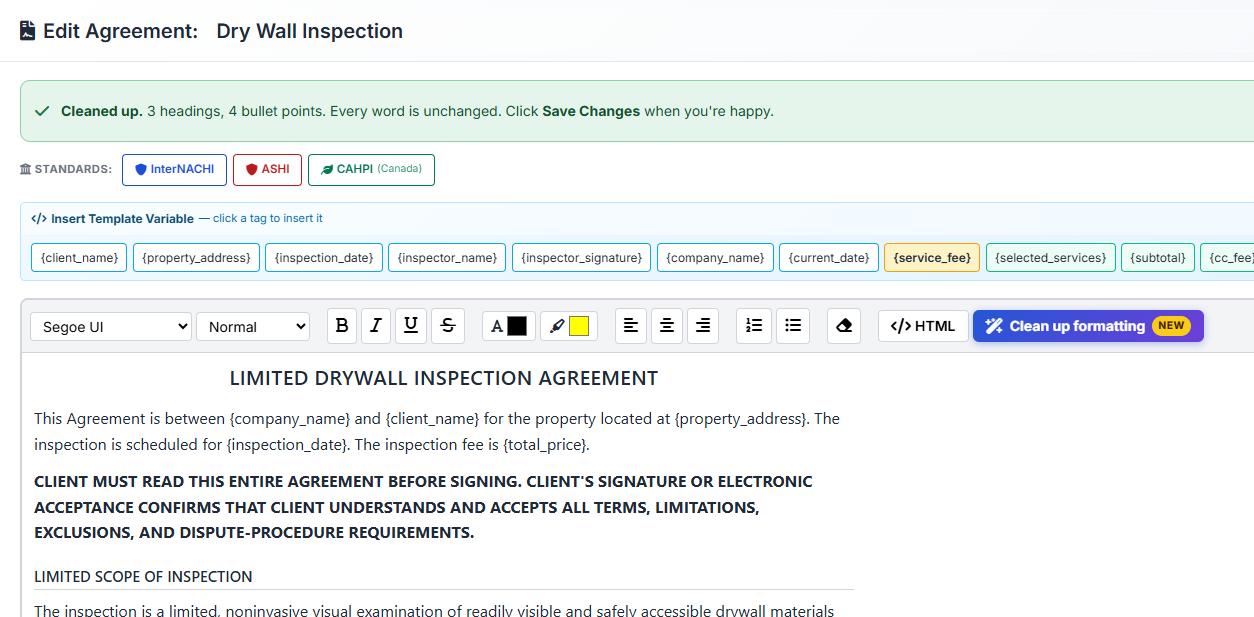
How It Works
Paste your agreement, or open one that's still a single block, and InspectorData asks "Make this easier to read?" It shows you exactly what it found before anything changes.
- 1. Paste or open - Paste your agreement from Word or a PDF, or open an existing one that's still unformatted.
- 2. We ask first - "Make this easier to read?" with a preview of what was found, such as 3 section titles, 4 bullet points, and 5 auto-fill fields.
- 3. One click - "Yes, clean it up" adds a centered title, section headings, paragraphs, bullet lists, bold numbered clause leads, and a separate initials box.
- 4. Compare, then save - Review before/after side by side, Undo if you change your mind, and nothing is saved until you click Save Changes.
What It Does
Structure your agreement already has, laid out the way a client can actually read it.
Headings & Paragraphs
A centered title, clear section headings, and the wall of text broken back into readable paragraphs.
Bullet Lists
Points that were buried mid-paragraph become an actual bullet list, easy to scan in seconds.
Numbered Clauses
Clause leads like "1. Scope of Inspection:" get bolded so clients can find the section they're looking for.
Initials Box
Initials lines are pulled out of the paragraph flow and given their own dedicated box.
Auto-Fill Fields Kept
Fields like {client_name}, {property_address}, and {total_price} are preserved exactly as they were.
Compare & Undo
See before and after side by side, undo the change, or say No thanks. Nothing saves until you click Save Changes.
Why Inspectors Care
Your service agreement is often the first document a new client reads and signs. Clean formatting doesn't change a single word of your contract, but it changes whether a client actually reads it before signing.
- Your Wording, Never Changed - Every character of the visible text is checked before and after; the clean-up refuses if even one differs.
- No AI Rewrites - It formats the structure that's already in your text. It never rewrites your contract.
- Works Everywhere You Write Agreements - Paste-in detection, Create New Agreement, and a "Clean up formatting" button in the editor toolbar for any existing agreement.
- Already Applied Platform-Wide - Every existing plain-text agreement on InspectorData has already been cleaned up, so clients are already seeing a formatted version.
Built by InterNACHI Certified Inspectors
Agreements get pasted in from Word and PDFs every day, and they rarely arrive looking the way they should. We built a clean-up that respects your contract's wording completely and just makes it look like the professional document it already is.
Stop Asking Clients to Sign a Wall of Text
One click adds headings, bullets, numbered clauses, and an initials box. Your wording never changes. Free 30-day trial.
Frequently Asked Questions
Will it change my wording?
No. InspectorData checks every character of the visible text before and after formatting, and refuses to apply the clean-up if even one character differs. Only the formatting changes, never the words.