Automated inspection reminders that send themselves
Automations sends the right email at the right moment for every job, from booking confirmation to the annual maintenance check-in a year later. Fifteen ready-made automations, each with its own on/off switch. Included with every account, currently in Beta.
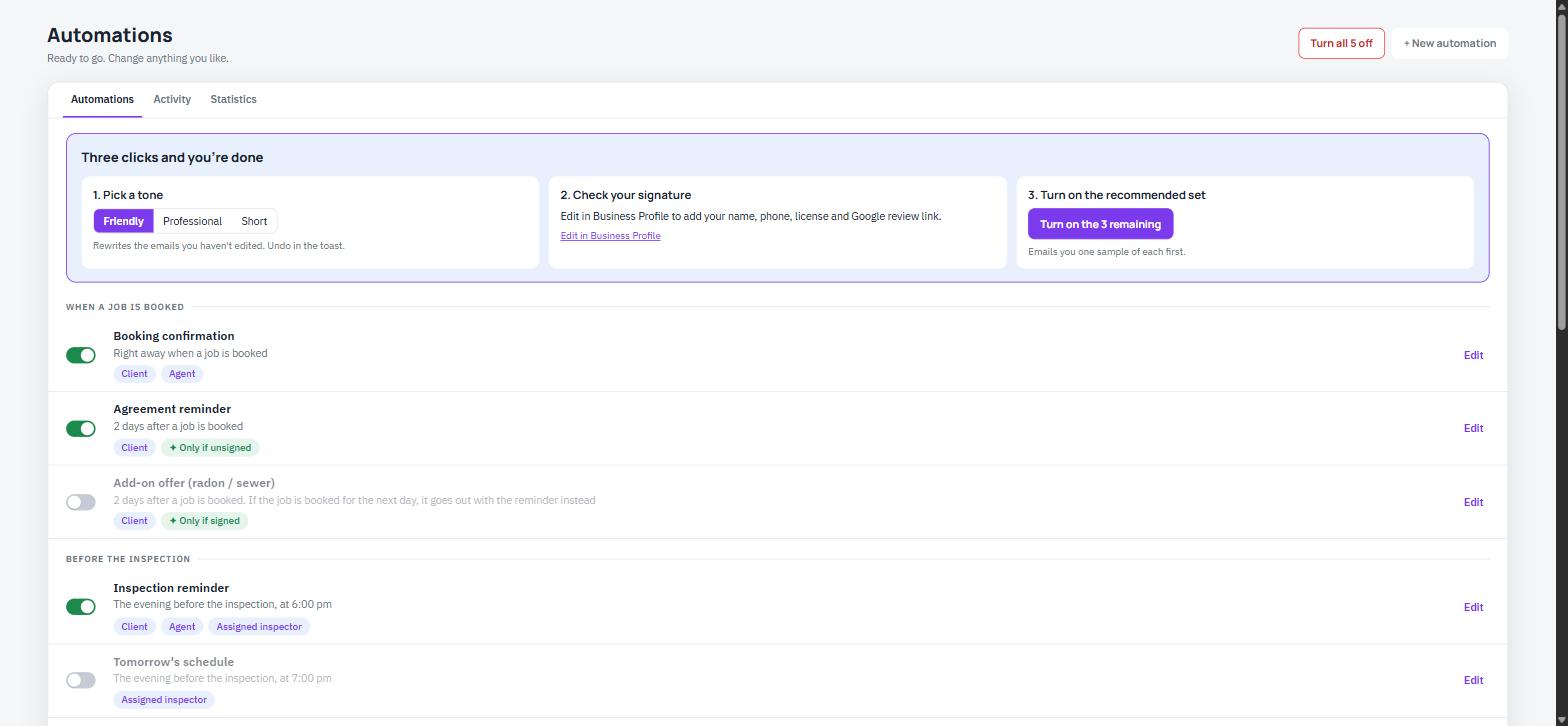 15 Ready-Made Automations
Why Do Inspectors Forget to Follow Up?
Every job has a dozen small emails around it. Missing one costs a review, a payment, or a repeat client.
Reminders Get Forgotten
Manually emailing every client the night before, chasing unsigned agreements, and nudging late payments takes time you don't have between jobs.
Reviews Never Get Asked For
The best time to ask for a review is right after the report goes out. If nobody sends that email, the review never happens.
Repeat Business Falls Through
Warranty expirations and annual maintenance windows come and go with no one tracking them, so repeat clients go find someone else.
How Does Automations Decide When to Send?
Each automation is tied to an event in the job's life, a booking, an inspection date, or a report publish, and fires on its own schedule from there. Turn any automation off, edit its email, or pause everything at once from one screen.
- On/Off Per Automation - Every one of the 15 automations has its own switch and an Edit button for the email content.
- Conditions Keep It Relevant - Chips like "Only if unsigned," "Only if paid in full," and "Stops when they pay" show exactly when each one fires.
- Tone Setting - Choose how the emails sound, for example Professional, to match your brand.
- Activity & Statistics Tabs - See what was sent and how automations are performing without leaving the page.
Which 15 Automations Are Included?
Grouped by when they fire in the life of a job, from booking to a year after the report ships.
When a Job Is Booked
Booking confirmation to client and agent right away. Agreement reminder two days later if still unsigned. Radon or sewer scope add-on offer once the agreement is signed.
Before the Inspection
Inspection reminder to client, agent, and inspector at 6pm the evening before. Tomorrow's schedule to the inspector at 7pm. Rescheduled and cancelled notices sent immediately.
After the Report
Payment received confirmation when paid in full. Two payment reminders, two and five days out, that stop once the client pays. Review request and agent thank you.
Months Later
Pre-warranty-expiration reminder at 11 months for new builds. Annual maintenance check-in at 12 months for existing homes. Agent nudge at 3 months, approved by you before it sends.
Why Inspectors Care
Automations runs in the background so the emails that build trust and bring clients back still go out, even on your busiest week. Nothing sends from a stranger's address; every email carries your company name and replies land in your inbox.
- Fewer Missed Reminders - Clients and inspectors get the evening-before reminder automatically, every time.
- Faster Payment - Two scheduled payment reminders follow up so you don't have to chase invoices by hand.
- More Reviews - A thank you and review request goes out two days after the report, while the inspection is still fresh.
- Repeat Business Tracked - Warranty and annual maintenance reminders keep past clients coming back without a spreadsheet.
Clients Choose What They Receive
Automations respects each client's own preferences, not just yours.
- Three Switches - The end client has three switches in their own client dashboard: appointment reminders, report updates, and follow-ups.
- Off Means Off - Switching one off stops that kind of automation for them, right away.
- Transactional Always Sends - Receipts, agreements, report delivery, and other transactional emails always go out.
- Unsubscribes Are Honored - A client who unsubscribed or whose address hard-bounced is never emailed by automations.
Built by InterNACHI Certified Inspectors
We built Automations around the emails we were already sending by hand on every job, booking confirmations, reminders, payment follow-ups, and review requests, based on what an inspection business actually needs to send.
Let Your Reminders Send Themselves
Fifteen automations, included with every account. Free 30-day trial.
Frequently Asked Questions
What emails does Automations send?
Fifteen ready-made automations grouped by timing: booking emails (confirmation, agreement reminder, add-on offer), pre-inspection emails (inspector and client reminders, rescheduled or cancelled notices), post-report emails (payment received, payment reminders, review request, agent thank you), and long-term emails (warranty expiration reminder, annual maintenance check-in, agent nudge).