Your Entire Subcontractor Network in One Dashboard
Manage radon testers, sewer scope technicians, mold inspectors, and every subcontractor your inspection business relies on. Map view, rate tracking, job history, payables, and contractor invites -- all from one place.
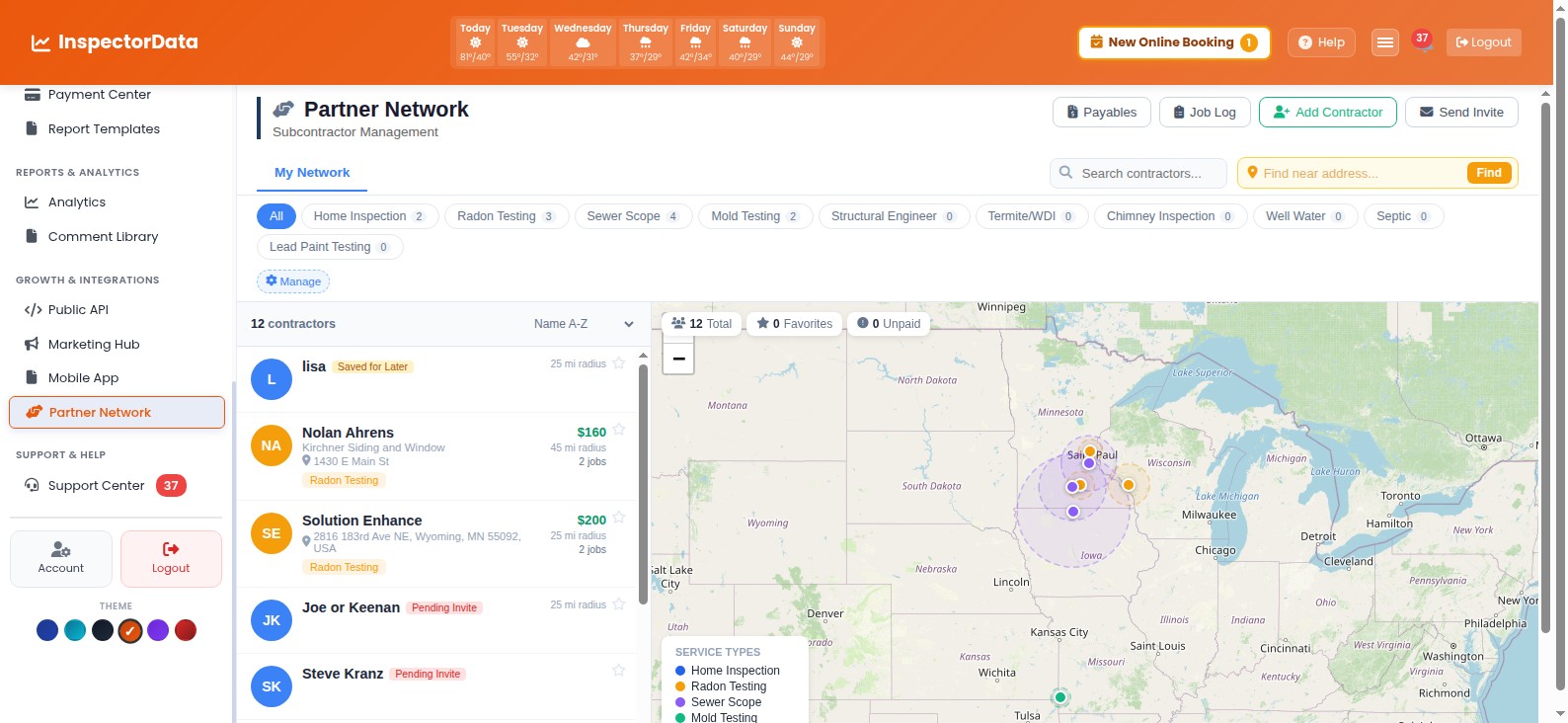 Partner Network
Subcontractor Management Shouldn't Be a Second Job
You run an inspection company, not an accounting firm. Stop juggling spreadsheets and sticky notes.
Scattered Contractor Info
Phone numbers in your contacts, rates in a spreadsheet, availability in your head. When you need a radon tester for a job tomorrow, you're digging through three places to find the right one.
Lost Track of Payments
Did you pay the sewer scope tech for last Tuesday's job? Was the mold inspector's rate $150 or $175? Without a system, contractor payments slip through the cracks and eat into your margins.
No Coverage Visibility
A client books an inspection 40 miles out. You need a radon tester who covers that area. Without a map of your network, you're making calls and hoping someone is available.
One Dashboard for Every Contractor Relationship
The Partner Network centralizes every subcontractor your inspection company works with. See who covers what area, what they charge, how many jobs they've completed, and what you owe them -- all without leaving InspectorData.
- Contractor Profiles - Name, contact info, service types, rates, and notes in one place.
- Service Type Tags - Radon, sewer scope, mold, termite, chimney, septic, and custom types.
- Rate Management - Store agreed rates per service type. No more guessing or re-negotiating.
- Coverage Areas - See at a glance which contractors serve which regions.
Everything You Need to Run Your Subcontractor Network
Built specifically for home inspection companies that coordinate with ancillary service providers.
Interactive Map View
See all your subcontractors plotted on a map by location and coverage area. Filter by service type to find the closest radon tester or sewer scope tech to any job site.
Service Type Filtering
Filter your network by radon testing, sewer scope, mold inspection, termite, chimney, pool, septic, or any custom service type you define. Find the right contractor in seconds.
Rate Tracking
Store negotiated rates for each contractor and service type. When you assign a job, the correct rate auto-populates. No more digging through old emails for pricing.
Job History Log
Every job assigned to a contractor is logged with date, address, service performed, and rate. See a complete history of work with any subcontractor at a glance.
Payables Tracking
Track outstanding balances per contractor. Mark invoices paid, view payment history, and export summaries. Never miss a subcontractor payment again.
Contractor Invites
Invite new subcontractors to join your network with one click. They complete their profile, set their availability, and you're ready to assign jobs immediately.
How It Works
Get your subcontractor network organized in three steps.
Add Your Contractors
Enter your existing subcontractors or send them an invite link. Add their service types, rates, phone, email, and coverage area. Import from a spreadsheet or add them one at a time.
Assign Jobs from Your Calendar
When an inspection needs ancillary services, assign a subcontractor directly from the booking. Pick the service type, choose a contractor from your network, and they get notified automatically.
Track Jobs and Payments
Jobs are logged automatically with rates. See what you owe each contractor, mark invoices paid, and keep a clean ledger without spreadsheets. Export payment summaries anytime.
Why Inspection Companies Switch to Partner Network
Stop managing contractors with spreadsheets, text messages, and memory. The Partner Network gives your inspection business a real system for subcontractor coordination.
- Save 2+ Hours Per Week - No more searching contacts, re-confirming rates, or manually tracking payments. Everything lives in one place.
- Never Miss a Payment - Payables tracking ensures every subcontractor gets paid on time. Build trust and keep your best contractors coming back.
- Grow Your Network Confidently - Add new radon testers, sewer scope techs, and specialists as your business expands into new areas without losing track.
- Know Your True Costs - See exactly what you spend on subcontractors per month, per job, or per service type. Make smarter pricing decisions.
- Faster Job Assignments - Map view plus service type filters mean you find and assign the right contractor in seconds, not minutes.
Subcontractors Upload Reports Directly
No more chasing contractors for radon lab results, sewer scope videos, or mold reports. Each subcontractor gets a secure upload link tied to their assigned job. Files land in the right inspection record automatically.
- Secure Upload Links - Token-based access. Contractors upload without needing a full account.
- Auto-Attached to Inspections - Uploaded files are linked to the correct report. No manual filing.
- All File Types Supported - PDFs, videos, images, lab reports. Whatever your contractors deliver.
- Delivery Notifications - Get notified the moment a subcontractor uploads their deliverables.
Built by a Home Inspector Who Manages Subcontractors Daily
InspectorData was created by a Certified Master Inspector who coordinates radon testers, sewer scope technicians, and ancillary service providers on real inspections every week. The Partner Network was designed from firsthand experience with the exact pain points inspection company owners face when managing a subcontractor network.
Organize Your Subcontractor Network Today
Stop managing contractors with spreadsheets. Free 30-day trial.
Frequently Asked Questions
What types of subcontractors can I manage with InspectorData's Partner Network?
You can manage any subcontractor type used in the home inspection industry including radon testers, sewer scope technicians, mold inspectors, termite/WDI inspectors, chimney inspectors, pool and spa inspectors, septic system inspectors, and general contractors. Each contractor gets a profile with their service types, rates, coverage area, and job history.