Every page, every photo, every finding reflects your professionalism. Make it look like you charge $500+ — because inspectors who produce polished, detailed reports get more referrals, more repeat clients, and more authority in the market.
The good news: you don't have to spend hours to produce a great report. The 7 techniques in this guide can cut your report writing time by two-thirds without sacrificing quality.
After 11 years, 2,750+ inspections, and more late nights spent writing reports than I care to admit, I can tell you that report writing is the single biggest bottleneck in a home inspection business. Most inspectors spend 60 to 90 minutes per report. Some spend two hours or more. That is time you are not getting paid for, and it is time you could be spending on-site, generating revenue or simply being present with your family. In this guide, I am going to share the exact techniques that have cut my own report writing time by two-thirds -- and how modern tools make it possible for any inspector to do the same.
The average home inspection takes about three hours on-site. But the work does not end when you leave the property. For many inspectors, the report writing phase adds another one to two hours of desk work per inspection. If you are doing three inspections per day, that is an extra three to six hours of unpaid labor. Over a year, that adds up to more than 1,000 hours -- roughly six months of full-time work -- spent typing instead of inspecting.
The good news is that in 2026, you do not have to accept that reality. The tools and workflows available today can compress your report writing time down to 15 or 20 minutes per inspection. Here are the seven techniques that make it possible.
Quick Answer
Write inspection reports faster by using AI-assisted software that auto-categorizes photos and generates comments. Inspectors using AI tools like InspectorData finish reports in 20-45 minutes instead of 2-4 hours — often completing them before leaving the property.
1. Use Pre-Built Report Templates
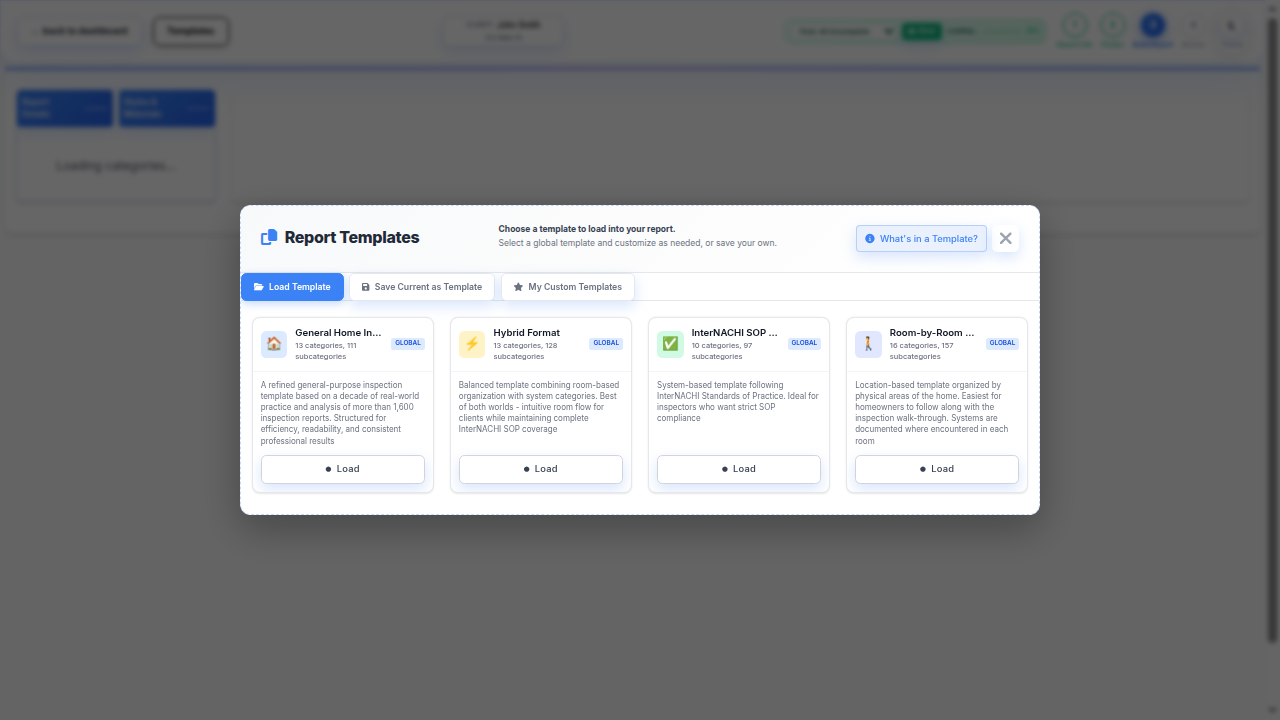
The fastest report you will ever write is the one that is already half-finished before you start. Pre-built report templates give you a complete framework for every inspection type -- residential, commercial, four-point, wind mitigation, and more -- with all the categories, subcategories, and standard language already in place.
A solid template should include every system and component you inspect on a routine basis: roofing, exterior, structure, electrical, plumbing, HVAC, interior, insulation, ventilation, and built-in appliances. Each section should have pre-populated descriptions of normal conditions, so you only need to document what deviates from the baseline. Instead of writing "The roof covering is asphalt shingles in serviceable condition with no visible deficiencies" for the 500th time, the template already has that language ready to go.
The key is customization. Generic templates save some time, but templates built around your specific inspection style, your local building codes, and your market's common construction types save dramatically more. If you inspect a lot of mid-century ranch homes in the Midwest, your template should reflect that. If you work in a coastal market where wind mitigation is standard, your template should have that section built in from the start.
2. Organize Photos During the Inspection with Auto-Categorization
Most inspectors take 100 to 300 photos per inspection. The problem is not taking the photos -- it is sorting them afterward. Sitting at your desk, scrolling through a camera roll, trying to remember which photo goes with which deficiency, and manually dragging images into the correct report sections is one of the most tedious parts of the entire process.

The solution is to categorize photos as you take them. A dedicated mobile inspection app lets you shoot photos directly into the correct report section. When you are in the attic documenting insulation depth, you take the photo from within the Insulation section of your report. The image is automatically tagged, categorized, and placed exactly where it belongs. No sorting later.
Some platforms go even further with AI-based auto-categorization. You take photos freely without worrying about which section you are in, and the software uses image recognition to identify what the photo shows -- a water heater, a panel box, roof flashing, condensation on a window -- and routes it to the appropriate report section automatically. This is not theoretical. It works today, and it works well.

Photo-to-Report in One Tap
InspectorData's mobile app auto-categorizes photos as you shoot, so every image lands in the right report section -- no sorting required.
Explore the Mobile App3. Build a Personal Comment Library
If you have been inspecting for more than a year, you have seen the same deficiencies hundreds of times. Deteriorated caulking around windows. Missing kick-out flashing at roof-to-wall intersections. Reversed polarity at outlets. GFCI protection absent in required locations. Double-tapped breakers. Improper grading directing water toward the foundation.
Writing a fresh narrative comment for each of these recurring issues is a waste of your time. A well-built comment library gives you a catalog of professionally written, technically accurate descriptions for every common deficiency, organized by system and severity. You select the relevant comment, drop it into your report, and make minor edits to match the specific conditions you observed.
The best comment libraries are not static. They grow with you. Every time you encounter an unusual condition and write a custom comment for it, you save that comment back to your library for next time. Over the course of a year, you build a comprehensive database of language that covers virtually every situation you encounter in the field. By year two, you are rarely writing anything from scratch.
4. Use AI-Generated Comments from Photo Analysis
This is the technique that has changed the game the most in the past year. AI-powered report writing tools can now analyze your inspection photos and generate accurate, detailed narrative comments automatically. You take a photo of a cracked heat exchanger, and the software produces a comment that identifies the component, describes the deficiency, explains the implication, and recommends appropriate action.
The quality of AI-generated comments has improved dramatically. Early versions produced generic, vague language that required heavy editing. Current systems produce comments that are specific, technically accurate, and written in professional inspection language. They reference the correct standards, use appropriate terminology, and match the tone and style that clients and real estate agents expect.
The workflow is simple. You take a photo on-site, the AI analyzes it and generates a draft comment, and you review and approve it -- usually with minimal editing. For straightforward deficiencies like missing GFCI protection, damaged shingles, or improper dryer venting, the AI comment is typically ready to use as-is. For more complex or nuanced conditions, you might adjust the language or add context, but the heavy lifting is already done.
5. Use Voice-to-Text On-Site
Your voice is faster than your thumbs. The average person types 30 to 40 words per minute on a phone keyboard. The average person speaks at 130 words per minute. That is a 3X speed improvement right there, and it is available on every smartphone today without any additional software.
The most effective approach is to dictate your observations into the correct report section while you are still standing in front of the deficiency. You are looking at a cracked foundation wall, so you tap into the Structure section, hit the microphone icon, and say: "Vertical crack approximately one-quarter inch wide observed in the north foundation wall, extending from the sill plate to approximately 18 inches below grade level. Monitor for movement. Recommend evaluation by a structural engineer if crack width increases." That took about 10 seconds to dictate. Typing it would take 45 seconds or more.
Voice-to-text accuracy has improved substantially in recent years. Modern speech recognition handles technical inspection terminology -- sill plate, flashing, weep screed, anti-siphon valve, AFCI, GFCI -- with high accuracy. The occasional transcription error is easy to catch during a quick review pass, and it is still far faster than typing everything manually.
6. Batch Your Report Writing by Section
If you are writing reports sequentially -- starting at the roof and working your way down to the crawl space for each report -- you are leaving efficiency on the table. Batching by section means you write all of the roofing sections for all of your day's reports at once, then all the electrical sections, then all the plumbing sections, and so on.
This works because of how your brain handles context switching. When you are focused on roofing, you are thinking in roofing terms. Your mental model includes shingle types, flashing details, ventilation requirements, and common roof deficiencies. Switching to electrical means loading an entirely different mental framework -- panel ratings, conductor sizing, grounding requirements, AFCI protection. Every context switch costs you time and mental energy.
Batching eliminates those switches. You stay in "roofing mode" for all three reports, then shift to "electrical mode" for all three. Your comments are more consistent, your language is more precise, and you move through each section faster because you are not constantly re-orienting yourself.
This technique pairs particularly well with a comment library. When you are writing all of your roofing sections at once, you are pulling from the same subset of your library repeatedly, which means you barely need to search at all after the first report.
7. Master Keyboard Shortcuts and Text Expansion
This is the least glamorous tip on the list, but it delivers consistent, compounding time savings. Every time you reach for your mouse to click a menu item, format text, insert a photo, or navigate between report sections, you are losing two to three seconds. Over the course of a report with hundreds of interactions, those seconds add up to 10 or 15 minutes of unnecessary mouse movement.
Learn the keyboard shortcuts in your inspection software. Most platforms have shortcuts for navigating between sections, inserting comments from your library, adding photos, marking items as deficient, and saving your progress. Memorize the five or six shortcuts you use most frequently and force yourself to use them for two weeks. After that, they become automatic.
Beyond software-specific shortcuts, text expansion tools let you type short abbreviations that automatically expand into full phrases or sentences. Type "reco" and it expands to "Recommend evaluation and repair by a qualified licensed contractor." Type "gfci" and it expands to "GFCI (Ground Fault Circuit Interrupter) protection is absent at this location. This is a safety concern. Recommend installation of GFCI-protected receptacles or GFCI breakers in all required locations per current standards." You define the abbreviations and expansions once, and they work across every report you write.
Time Savings Summary
Here is a realistic breakdown of how each technique contributes to faster report writing. These estimates are based on a standard residential inspection with 150 to 200 photos and 30 to 40 comment items.
| Technique | Time Saved Per Report | Difficulty to Implement |
|---|---|---|
| Pre-built report templates | 15 - 20 min | Low -- one-time setup |
| Photo auto-categorization | 10 - 15 min | Low -- use mobile app |
| Personal comment library | 10 - 15 min | Medium -- builds over time |
| AI-generated comments | 15 - 25 min | Low -- available now |
| Voice-to-text on-site | 5 - 10 min | Low -- practice needed |
| Batch writing by section | 5 - 10 min | Low -- workflow change |
| Keyboard shortcuts and text expansion | 5 - 10 min | Low -- memorization |
| Combined Total Savings | 65 - 105 min | -- |
For an inspector averaging 90 minutes per report, implementing even half of these techniques brings that number down to 30 minutes or less. Implement all seven and you are looking at 15 to 20 minutes of report writing per inspection.
Write Reports in Minutes, Not Hours
Snap a photo, get a professional comment in seconds. InspectorData's AI analyzes your images and generates accurate, context-specific report language automatically.
See AI Reports in ActionAI Is Changing Report Writing -- Permanently
The inspection industry is at an inflection point. For decades, report writing has been a manual, time-consuming craft that every inspector simply accepted as part of the job. AI has fundamentally changed that equation. Photo analysis, natural language generation, and intelligent comment libraries are not future technology -- they are production tools that thousands of inspectors are using today.
The inspectors who adopt these tools now are gaining a significant competitive advantage. They complete more inspections per day, deliver reports faster to clients and agents, maintain higher quality and consistency across their reports, and avoid the burnout that comes from spending half your working hours at a desk. That advantage compounds over time. An inspector who saves one hour per report and does 250 inspections per year reclaims 250 hours -- more than six full work weeks -- every single year.
The goal is not to remove the inspector from the process. Your expertise, your judgment, and your ability to identify conditions that matter to your clients are irreplaceable. The goal is to remove the mechanical, repetitive parts of report writing so you can focus on what actually requires a trained professional: observing, analyzing, and communicating what you found.
Whether you start with one technique or implement all seven at once, the path to faster report writing is clear. Pick the technique that addresses your biggest bottleneck, implement it on your next inspection, and measure the difference. Then add the next one. Within a month, you will wonder how you ever wrote reports the old way.
Ready to Transform Your Inspection Business?
Join hundreds of inspectors writing better reports in less time with InspectorData.
Start Your 30-Day Free Trial